Borneo KnoxErase Tool Version V1.6.4 Released on 14.10.2023
Version 1.6.4 update!!
-FIXED ERASE KG METHOD
-MORE BUGS FIXED
Email: BORNEOGSM
Password: BORNEOGSM

Borneo KnoxErase Getting Started: Logging In
Download link
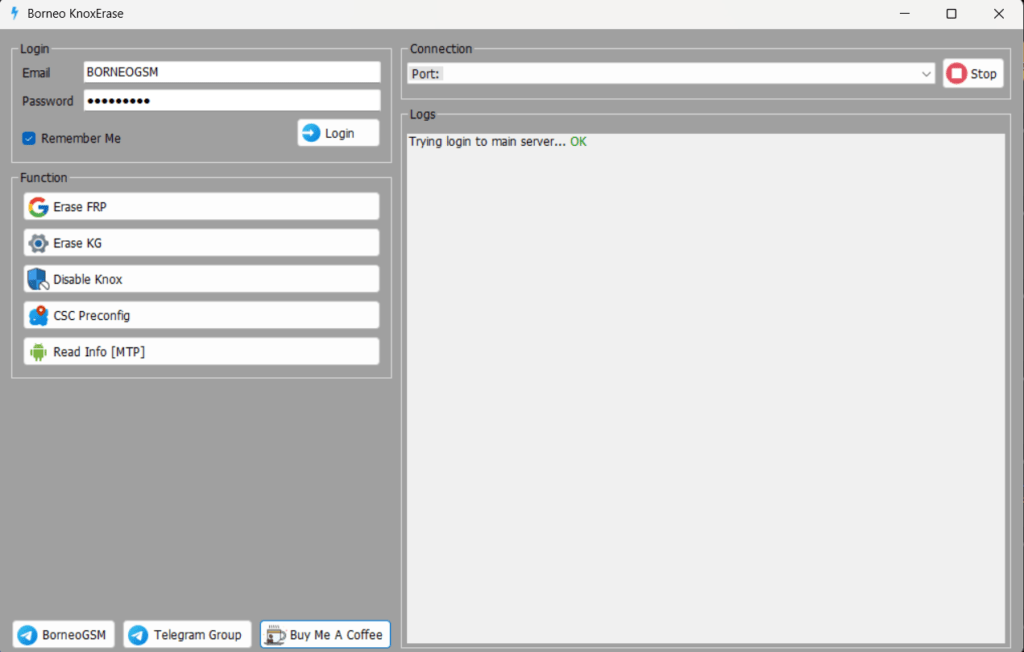
To begin your unlocking journey, log in with your credentials:
Email: BORNEOGSM
Password: BORNEOGSM

Connecting Your Device
Ensure a smooth connection to your Samsung device by following these steps
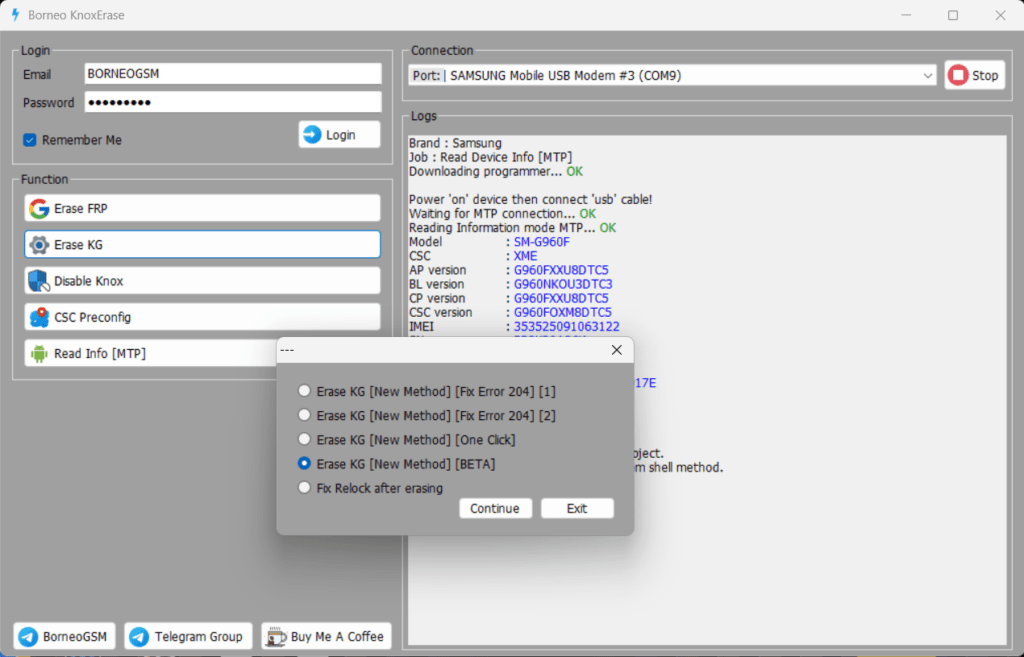
Port: SAMSUNG Mobile USB Modem #3 (COM9) Connection: Click “Connect” to establish a connection.
Borneo KnoxErase Accessing Device Information
Before proceeding with the unlocking process, it’s essential to gather the necessary information about your device:
Model: SM-G960F CSC: XME BL version: G960NKOU3DTC3 AP version: G960FXXUBDTC5 CP version: [CP version] CSC version: G960FOXM8DTCS : 3596525091063122
Borneo KnoxErase Unlocking Samsung Devices
Now that you have collected the required information, let’s move on to unlocking your Samsung device using the Borneo KnoxErase tool.
Step 1: Erase FR
PErase FRP: Begin by selecting this option and follow the on-screen instructions.
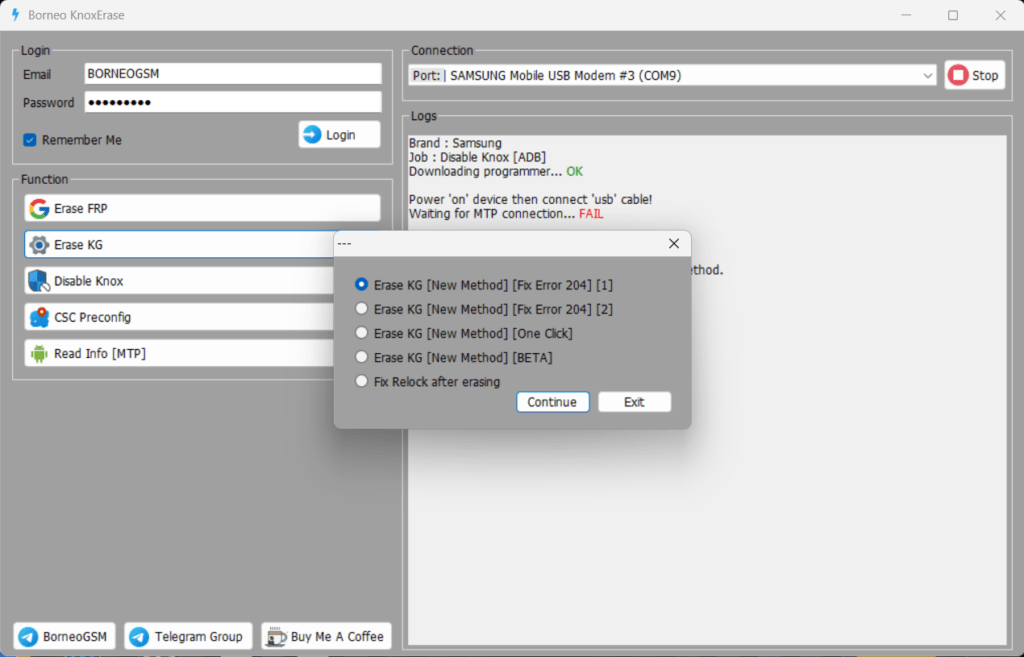
Step 2: Erase KG [New Method]
Erase KG [New Method] [Fix Error 204] [1] Erase KG [New Method] [Fix Error 204] [2] Erase KG [New Method] [One Click] Erase KG [New Method] [BETA]
Choose the appropriate method that suits your needs and proceed accordingly.

Step 3: Fix Relock (if necessary)
If you encounter any issues with relocking after erasing, use the provided options to resolve the problem.
Completing the Process
Once you’ve followed the necessary steps, your device will be unlocked, and the Factory Reset Protection will be removed.
Note: It’s essential to power on your device and connect it via USB cable during the process. Ensure a stable MTP connection for a successful unlock.
Acknowledgments
We want to extend our gratitude to the following contributors for making this project possible:
Kagemi.Inc @zesuga: For their invaluable contributions to the project
@wr3cckl3ss1: For their expertise in the system shell method.
Unlock your Samsung device with confidence using the Borneo KnoxErase tool. Enjoy the freedom of an unlocked device and explore its full potential.
Borneo KnoxErase – 2023.10.09
Credit to Kagemi.Inc @zesuga for this project.
Special thanks to @wr3cckl3ss1 for the system shell method.
Don’t let your locked Samsung device hold you back. Try Borneo KnoxErase today and regain control!
Borneo KnoxErase MAIN Function list
Erase Google Account Lock [] FRP [] Erase Knox Guard lock Erase KG Disable Knox CSC Preconfig Read info [ MTP Mode]

Unlocking Samsung Devices Made Simple: Borneo KnoxErase Features
1. Erase Google Account Lock [FRP]
Say goodbye to the Google Account lock (Factory Reset Protection) with just a few clicks. Borneo KnoxErase makes it easy to remove this barrier and regain access to your Samsung device.
2. Erase Knox Guard Lock [Erase KG]
Disable the Knox Guard lock (Knox Guard) effortlessly. This feature ensures that you can unlock your device and access its full functionality without any restrictions.
3. Disable Knox
Disable Knox entirely, allowing you to customize your Samsung device as you see fit. No more limitations or locked features; enjoy full control.
4. CSC Preconfig
Access the CSC (Consumer Software Customization) preconfiguration options, allowing you to tailor your device’s settings and features to your specific needs.
5. Read Info [MTP Mode]
Retrieve essential information about your Samsung device effortlessly while in MTP (Media Transfer Protocol) mode. Get insights into your device’s model, CSC, firmware versions, and more.