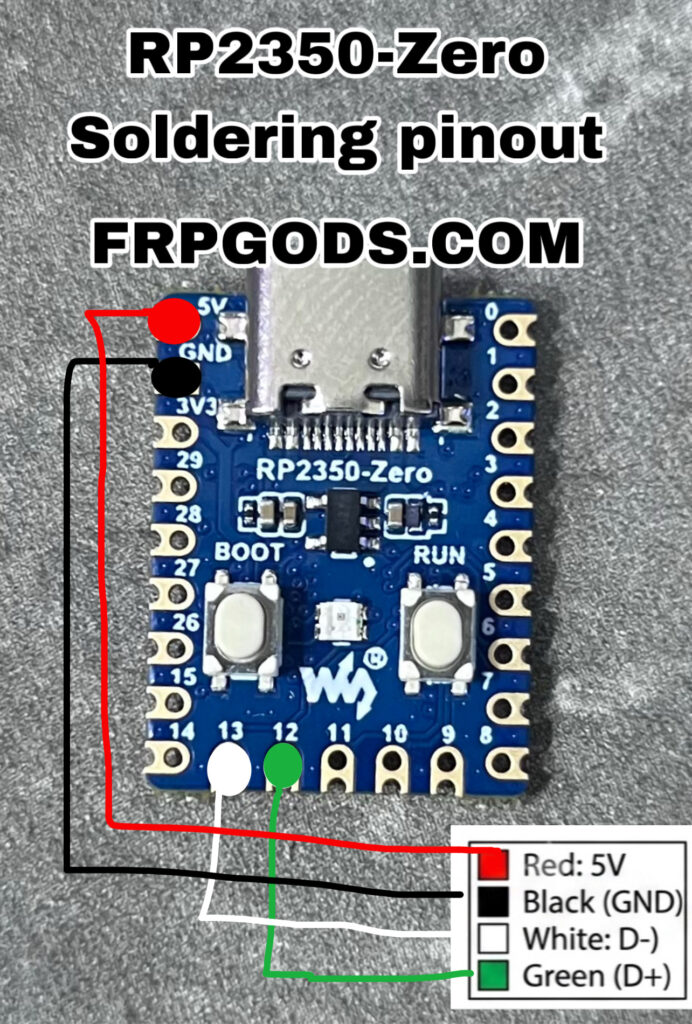
If you’re wiring up custom data cables or external power to the Waveshare RP2350-Zero, here’s a quick reference guide for your connections:

Pin Mapping
- 🔴 Red (5V Power): Connect to the
5Vpin on the board. - ⚫ Black (Ground): Connect to any
GNDpin. - ⚪ White (USB Data – / D-): Connect to
GP13(Pin 13). - 🟢 Green (USB Data + / D+): Connect to
GP12(Pin 12).
Important Note for PIO/Software USB
Standard USB hardware controllers typically map to dedicated native USB pins via the Type-C port. When soldering D- and D+ directly to GPIO pins like GP13 and GP12, ensure your firmware/library (such as PIO USB or software USB bit-banging) is properly configured to map data lines to those specific GPIO pins.

Happy tinkering! 💻⚡